Systems / HR & Attendance
HR & Attendance
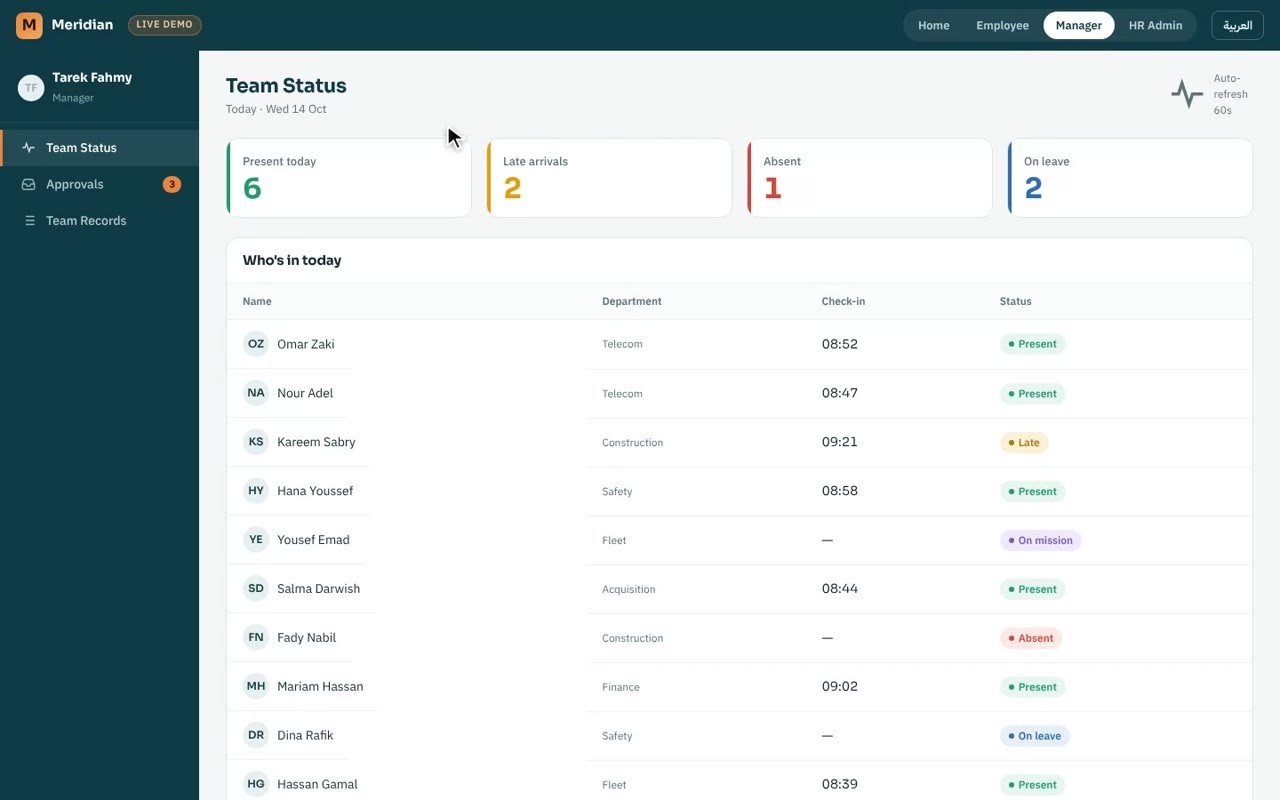
Staff check in and out from their phones, verified by fingerprint and location; managers approve leave and missions; HR keeps one clean record.
- AREA
- Human resources
- USERS
- Five roles, employee to HR
- BUILT
- Apr – Aug 2026
- RUNS ON
- Google Sheets · Apps Script · Geolocation
01 · THE PROBLEM
Who was really at work, and where?
Staff work across offices and field sites. Attendance had to be trustworthy without a clock-in machine at every location, and requests had to reach the right manager.
BEFORE THE SYSTEM
Attendance came from a standalone fingerprint machine with no link to the HR manager's computer, and every leave or mission request was done on paper.
02 · WHAT IT DOES
- a.Check-in asks for the fingerprint first, then the location.
- b.The geofence is checked twice: in the app and again on the server.
- c.Leave and mission requests go to the employee's manager for approval.
- d.Five roles, from employee to HR, each seeing only its own part.
03 · HOW IT'S BUILT
A phone app with the rules on the server
PHONE
Employee app
Fingerprint, location, requests.
APPS SCRIPT · GOOGLE SHEETS
Server-side checks
Geofence, roles and approvals are verified on the server, not trusted from the phone.
DESK
Manager & HR views
Team status, approvals, records.
04 · DESIGN DECISIONS
Rules that keep the record honest
- Never delete Attendance records are never deleted; mistakes are fixed with corrections that keep the history.
- Identity before place The fingerprint comes first, so a location alone can't check anyone in.
- Trust the server Every check the app makes is repeated on the server.